Button Functions
Autofocus (AF)
Press to turn OFF/ON the autofocus capabilities depending on usage.
Freeze Frame (FF)
- To freeze the live video, press the FF button and release.
- The image is frozen upon release of the button.
- The still image remains on the screen until you press the FF button again to release the frozen image.
LED Light Control
- Press the LED button to turn on the TotalExam 3.2 LED ring. The light intensity level is at the lowest setting.
- Press the button again to increase the light intensity until it reaches the highest level.
- Press the button after the highest intensity level is reached to shut off the LED ring.
White Balance (WB)
- Hold a white sheet of paper four inches in front of the camera.
- Aim the camera at the paper.
- Press the WB button once the view is filled with as much of the paper as possible.
Changing Heads
Do not drop the instruments as they are delicate pieces of equipment.
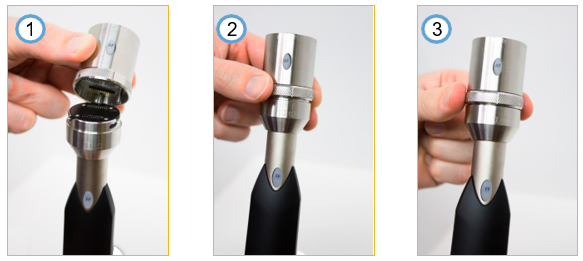
| DO line up the pins in the head with the holes in the camera wand. | DO gently place the head on the wand. Position the line on the locking ring above the open lock symbol. | DO twist the locking ring to align the line on the locking ring with the locked symbol. | ||
| DO NOT push very hard to connect the two parts. | DO NOT jam the head onto the wand. | DO NOT excessively force lock into place. |
These instructions apply to the autofocus and the otoscope heads.